


How to use the WooCommerce REST API: complete guide
The WooCommerce REST API is one of the most powerful tools for integrating external stores, creating automations, synchronizing inventory, generating orders from other systems, and more. In this guide, you’ll learn what it is, how to activate it from the WordPress dashboard, which endpoints are most important, and how to use them. You’ll also find two advanced PHP examples and a complete Postman collection to explore the API quickly.
What is the WooCommerce REST API?
The REST API allows you to interact with WooCommerce from external systems using HTTP requests (GET, POST, PUT, DELETE).
All endpoints are located under: /wp-json/wc/v3/
How to activate the REST API in WooCommerce
Go to WooCommerce → Settings → Advanced → REST API
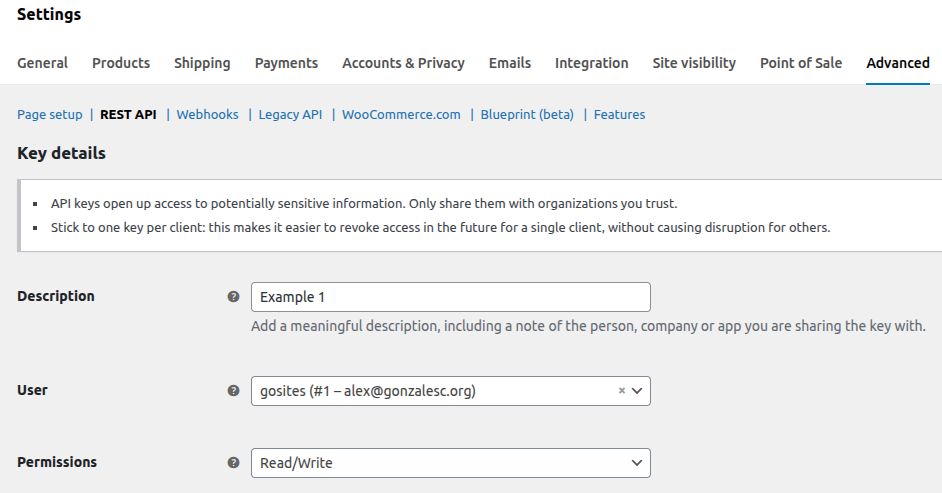
Put the user and the permissions to this RestApi; and copy the consumer key and the secret key.
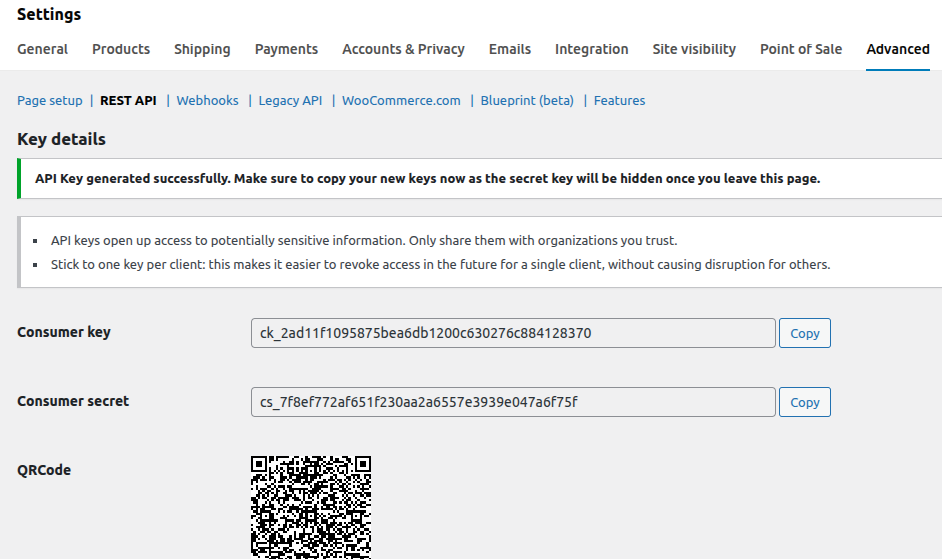
Authentication
From PHP, Basic Auth is the most common method: Authorization: Basic base64_encode(ck:cs)
Main WooCommerce REST API Endpoints
1. Products
GET /wp-json/wc/v3/products
GET /wp-json/wc/v3/products/{id}
POST /wp-json/wc/v3/products
2. Orders
GET /wp-json/wc/v3/orders
GET /wp-json/wc/v3/orders/{id}
POST /wp-json/wc/v3/orders
3. Customers
GET /wp-json/wc/v3/customers
GET /wp-json/wc/v3/customers/{id}
GET /wp-json/wc/v3/customers?email=email@mail.com
4. Variations
GET /wp-json/wc/v3/products/{id}/variations
5. Coupons
GET /wp-json/wc/v3/coupons
POST /wp-json/wc/v3/coupons
6. Categories
GET /wp-json/wc/v3/products/categories
Complete Postman Collection
You can test and browse all endpoints with this ready-to-use Postman collection:
Simply import it, add your API keys, and start testing.
Practical Examples in PHP
Below you’ll find two advanced integrations frequently used in real WooCommerce setups.
Example 1
Automatically replicate an order to another WooCommerce store
We use this hook: woocommerce_checkout_order_processed
This hook fires once when WooCommerce creates the order, making it ideal for external synchronizations.
<?php
add_action( 'woocommerce_checkout_order_processed', function ( $orderId, $postedData, $order ) {

    $orderData      = [];
    $orderItems     = [];
    $externalApi    = 'https://externalstore.com/wp-json/wc/v3/orders';
    $consumerKey    = 'ck_xxxxxxxxx';
    $consumerSecret = 'cs_xxxxxxxxx';

    foreach ( $order->get_items() as $item ) {
        $orderItems[] = [
            'product_id' => $item->get_product_id(),
            'quantity'   => $item->get_quantity(),
            'total'      => $item->get_total()
        ];
    }

    $orderData = [
        'payment_method'       => $order->get_payment_method(),
        'payment_method_title' => $order->get_payment_method_title(),
        'set_paid'             => $order->is_paid(),
        'billing'              => $order->get_address( 'billing' ),
        'shipping'             => $order->get_address( 'shipping' ),
        'line_items'           => $orderItems
    ];

    $response = wp_remote_post( $externalApi, [
        'headers' => [
            'Authorization' => 'Basic ' . base64_encode( $consumerKey . ':' . $consumerSecret ),
            'Content-Type'  => 'application/json'
        ],
        'body'    => json_encode( $orderData ),
        'timeout' => 20
    ] );

}, 10, 3 );
Example 2
When a new user is created, fetch their orders from another store and save them in usermeta
In this example, we search for the user by email in the external store:
GET /wp-json/wc/v3/orders?email=email@mail.com
Then we store the retrieved order IDs in the usermeta key orders_from_other_store.
<?php
add_action( 'user_register', function ( $userId ) {

    $userInfo       = get_userdata( $userId );
    $userEmail      = $userInfo->user_email;
    $externalApi    = 'https://externalstore.com/wp-json/wc/v3/orders?email=' . urlencode( $userEmail );
    $consumerKey    = 'ck_xxxxxxxxx';
    $consumerSecret = 'cs_xxxxxxxxx';

    $response = wp_remote_get( $externalApi, [
        'headers' => [
            'Authorization' => 'Basic ' . base64_encode( $consumerKey . ':' . $consumerSecret )
        ],
        'timeout' => 20
    ] );

    if ( is_wp_error( $response ) ) {
        return;
    }

    $data = json_decode( wp_remote_retrieve_body( $response ), true );

    if ( ! is_array( $data ) ) {
        return;
    }

    $orderIds = [];

    foreach ( $data as $order ) {
        if ( isset( $order['id'] ) ) {
            $orderIds[] = $order['id'];
        }
    }

    update_user_meta( $userId, 'orders_from_other_store', $orderIds );

} );
The WooCommerce REST API is essential for integrations between stores, mobile apps, ERPs, and custom automations.
With just a few steps—activating the API, creating a key, and understanding the main endpoints—you can build advanced features like synchronizing orders, users, products, or inventory across multiple shops.